ar be de es fr hi it ja ko nl pl pt ru tr uk uz zh en
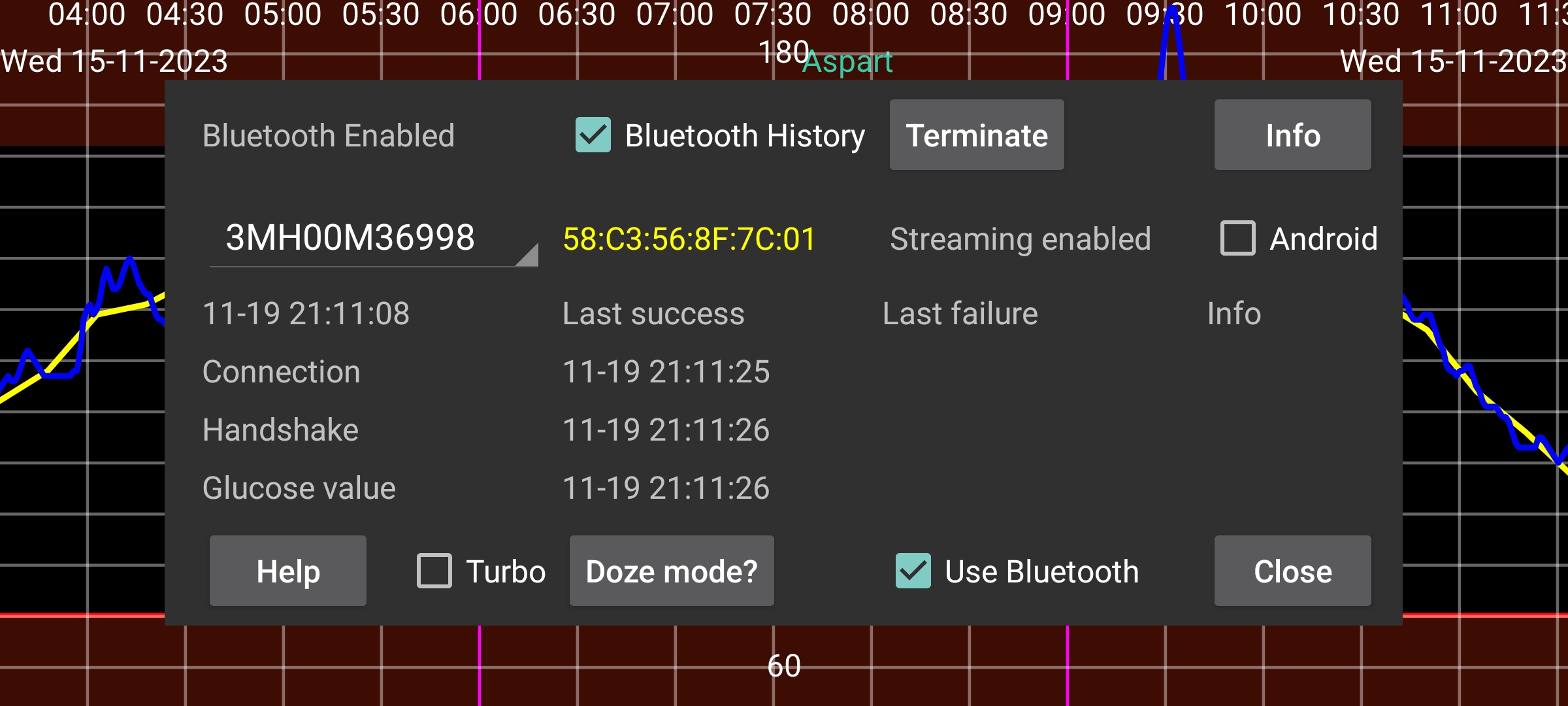
The spinner contains the name of the sensor. If Juggluco is using more than one sensor at the same time, you can select the sensor for which to show information.
Doze mode leads you to a screen with information on how to disable battery optimizations for Juggluco, that can prevent Juggluco from functioning.
Bluetooth history: On Libre 2, History values are past readings spaced 15 minutes apart. Previously they were only received by scanning. When you turn this option on, the History values are also received via Bluetooth. Also, other things will work differently. Juggluco then sends the history values to LibreView, instead of averages of the stream values. The disadvantage is that it is slower. This can be an issue on WearOS watches. This option has no effect on Libre 3 and US/CA/AU/KR Libre 2 sensors; they always receive history values via Bluetooth.
Bug: only present on WearOS for Libre 3. This needs to be set on Samsung Galaxy Watch 5 and higher, until Samsung fixes this bug. Without this option, glucose values will be received 2 instead of 1 minute apart. Samsung Galaxy Watch 5 through Ultra always receive Libre 2 values spaced two minutes apart.
⏰: Let Juggluco use an alarm clock function to ensure the correct timing of connecting to Dexcom G7 and ONE+ sensors. Without it, when the device is in deep sleep when not used, it will sometimes not awake to reconnect to the sensor and it will not immediately receive a glucose value. (My WearOS watch had this problem in the middle of the night, probably because I moved very little. Because of backfill afterward and slow awakening, I didn’t see it on the watch and phone, only in the log files. My phone doesn’t need this setting and seems to perform worse when it is turned on.) Also under Libre 3 you can delay reconnection attempts with this option, but in a totally different way and for different reasons: it is reported to result in less connection loss under Samsung Galaxy Watch9. It was made with the idea that fewer connection attempts could improve connectivity, but possibly it is because the timer wakes the device.
Permission: Before Android 12 location permission was needed for searching for Bluetooth devices. Android 12 and later have a Nearby devices permissions which is needed for all contact with Bluetooth devices.
The device address, if known, is displayed after the sensor identifier. Red means a US-like sensor.
Forget: Let Juggluco forget the device address and scan for the device address. For some sensors this is needed to get a connection and is then done automatically by Juggluco. With this button you can manually say that Juggluco should do that, because there are maybe other occasions in which it is also needed.
Terminate: stop connecting to this sensor via Bluetooth. If later you again want to receive stream glucose values from this sensor, you only have to scan it or touch “Activate” in sensor info.
Unpair: Linx/Lumiflex/Aidex X sensors remember the phone or watch they are paired with and refuse to bond to other devices. By pressing “Unpair” a command is sent to the sensor and if successful, it is again possibly for other phones or watches to connect to the sensor. When you use left menu→Watch→WearOS config → “Direct sensor …” to transfer the sensor from and to the watch, the unpairing will also be done, and you shouldn’t use “Unpair”.
Clear: (Button only present when connecting with
Linx/Lumiflex/Aidex X sensors.) Pressing this button removes all
glucose values from the sensor and restarts the sensor like it is a
new sensor. This makes it possible to use a sensor longer than 15
days. When I tried it, the values received after the sensor end date
were totally worthless, having about half the value of the Libre 3
sensor I ran parallel with it. If after a few weeks, you clear a
second time, the glucose values it gives become again much worse than
before (in my case very low). It doesn't seem to be longer sensor
use, but the clearing that is the problem.
Clearing involves a
lot of times scanning for bluetooth devices. The number of times an
app is allowed by Android to scan for devices within a certain time
period is restricted. If it does more, Android just drops the
request. The only thing you can do is turn Bluetooth off and on,
which resets this count.
Reset: Sibionics 2 only. When switching sensor in a transmitter this button should be pressed. Either when Juggluco is connected to the old sensor and/or when Juggluco is connect to the new sensor. You shouldn’t press it when the transmitter already was reset by another app.
Turbo: Increases the effort spent contacting the sensor, in the hope of fewer connection errors. May use more battery. Seems to be needed on Watch4 with Freestyle Libre 2 sensors, but not with Freestyle Libre 3 sensors and on none of the smartphones I tried it on.
Android: Let Android instead of Juggluco make the connection with the sensor. Don’t use it! In most cases it will take longer before a connection is established. This option was added to work around a bug in an Android 13 release, which has since been fixed. You should only turn this on when in this sensor screen no recent times are displayed. That means that no connection errors or sensor errors are shown, but also no values are received and you can get it working again by turning off and on Bluetooth. Connecting a European Libre 2 sensor to two apps on the same phone simultaneously (which is only possible for that variant) can also produce this state.
Info: Gives start and end times and last scan and stream times of sensor.
To connect to a FreeStyle Libre 2 sensor via Bluetooth Low Energy, Bluetooth must be turned on. Nothing happens until the sensor has been scanned successfully by this app. The sensor must not be connected to a FreeStyle reader or other apps on smartphones. Abbott's LibreLink app should be uninstalled, disabled or force-stopped. If you have started the sensor with Freestyle Reader and you can’t turn it off, you can prevent it from getting into contact with the sensor by putting the reader in a Faraday cage.
Use Bluetooth should be turned on.
If the above conditions are satisfied, it can still take a long time before the app receives glucose values from the sensor. Often it takes a minute, but at other times it takes much longer. The Connection stage gives the most difficulties. The most frequent are failures with status=133, which is the status argument of onConnectionStateChange(BluetoothGatt bluetoothGatt, int status, int newState). It means Bluetooth device not found. Nearly always it just takes some time before the device is found. It is also possible that the sensor is connected to another device, temporary not functioning well, other devices are interfering or the Bluetooth of Android doesn’t function. Sometimes turning Bluetooth off and on seems to help or rebooting the phone or turning off the Bluetooth connection of other devices. Other problems are sometimes resolved by scanning the sensor. Intervening water (including body water) can be a problem, so that wearing a WearOS watch on a different arm than the sensor can give connection problems when the arms are held in a way that the body is positioned between watch and sensor.
One Accu-Chek SmartGuide user reported that when a Bluetooth search couldn't find the sensor, the fix was to go to Connected devices in Android settings, select the sensor, and tap Forget.
Scanning a Libre sensor with Juggluco (with Use Bluetooth enabled) on another phone, will steal the connection away from this phone, and it can take some time, with scanning in between, to get it back again.